Key Takeaways
- Push notifications reach customers who have installed your app and allowed notifications, so earning that permission is the first job of any push program.
- Ask for permission in context, after a customer saves a product, requests a restock alert, or places an order. Apple and Google both recommend asking once the purpose is clear.
- Order updates, requested alerts such as back-in-stock and price drops, and a few well-targeted marketing campaigns make the strongest starting program.
- Every notification should open the exact product, cart, reward, or order it mentions.
- Judge push on incremental revenue, opt-outs, and uninstalls together, not on opens or attributed revenue alone.
Your email list and your SMS subscribers already give you ways to bring customers back. Both work, but both compete with a crowded inbox and a stream of other brands’ texts.
Once customers install your app, you gain another channel: a message on their lock screen that opens your store in one tap. A restock alert for a saved product feels like a service. An unrelated promotion every morning makes the same app feel intrusive, and customers respond by muting it or deleting it.
This guide explains how ecommerce push notifications work, how they differ from web push, email, and SMS, how to earn permission, which campaigns to start with, and how to measure whether push is adding revenue rather than just collecting credit for it.
What Is an Ecommerce Push Notification?
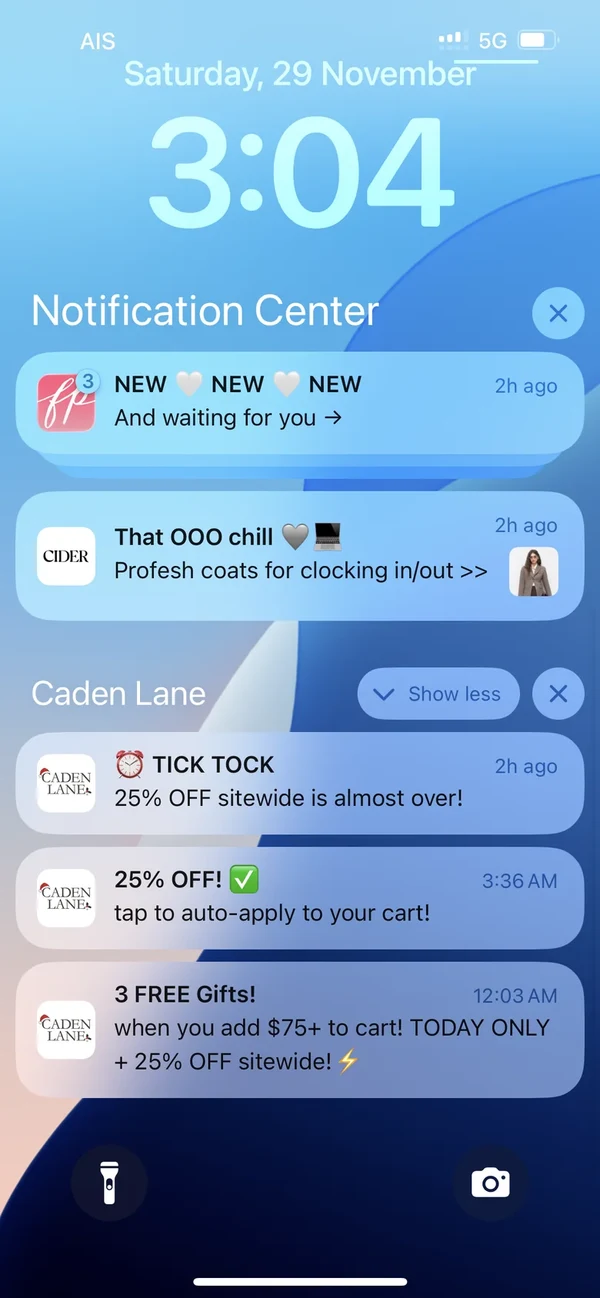
An ecommerce push notification is a message your store’s app sends through the phone’s notification system. It can appear on the lock screen, in the notification center, or as a banner while the customer uses another app.
Before you can send one, the customer has to install your app and grant notification permission. The app then registers the device so your messaging system can address it.
Many apps send through a cross-platform service such as Firebase Cloud Messaging. Google’s FCM documentation describes a trusted sending environment, such as your server, and a client app on Android, iOS, or the web that receives messages through the platform’s own transport service.
A notification can open your app generally or deep-link to a specific screen. Treat that destination as part of the campaign, because it decides whether the tap delivers what the message promised.
How Is App Push Different From Web Push?
App push comes from an installed iOS or Android app. Web push comes from a website after a visitor grants permission in a supported browser or an installed web app.
The two have different permission flows, platform support, and destinations. On iPhone, the gap is especially clear. According to WebKit’s February 2023 announcement, web push arrived with iOS and iPadOS 16.4 and works only for web apps the customer has added to their Home Screen.
For most ecommerce brands, app push is the more valuable channel. It can return customers to a signed-in app session, use in-app behavior for targeting, and open specific app screens. If you’re still weighing the formats, our comparison of native apps, mobile websites, and PWAs covers the broader tradeoffs.
When a provider says it supports push, confirm whether it means native app push, web push, or both.
Why Push Is Different From Email and SMS
Push is immediate, compact, and tied directly to your app. Customers don’t need to open an inbox, and you don’t need their email address or phone number to reach them.
It’s also more interruptive. Your notification sits beside messages from friends, calendar reminders, banking alerts, and delivery updates, which makes the permission more fragile than an email subscription.
That’s why push works best with a defined job in your retention mix. It may be your fastest channel for a back-in-stock request or a time-sensitive drop. Email can carry more explanation and creative. SMS may be reserved for your highest-value moments or for customers who prefer it.
Sending the same campaign across every channel at once isn’t an omnichannel strategy. It’s repetition. Our guide to how apps fit into an omnichannel strategy explains how to give each channel its own role.
How Does Push Permission Work on iOS and Android?
Push permission on both iOS and Android now starts from “off,” so customers must actively agree before you can reach them.
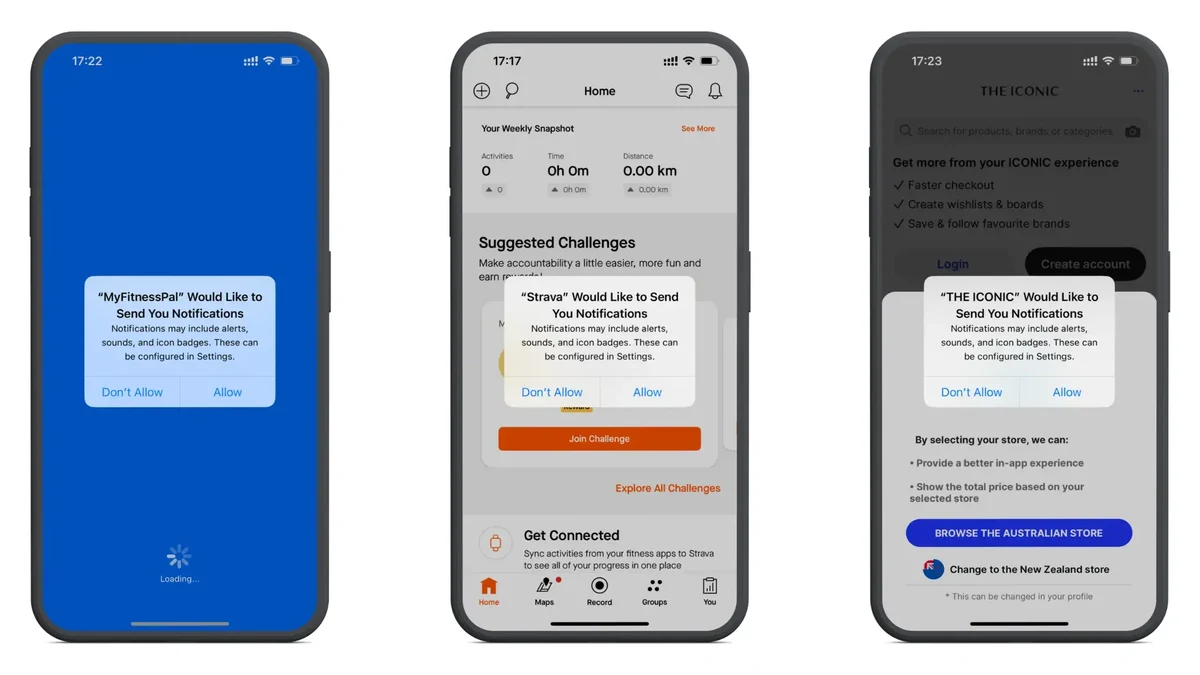
On iOS, your app requests authorization through a system prompt. Apple’s documentation says the system shows that prompt only the first time your app asks and records the answer. Later requests don’t prompt the customer again, so a quick “Don’t Allow” is hard to recover from.
Android now asks for permission too. Google’s Android documentation explains that since Android 13 (API level 33), notifications from a newly installed app are off by default until the customer grants the runtime permission.
That shift shows up in the data. In Batch’s 2025 push benchmark, covering messages sent between July 2024 and July 2025, average opt-in rates were 56% on iOS and 67% on Android. Android had fallen from 85% the year before.
iOS also offers provisional authorization. Apple’s documentation explains that these notifications arrive quietly in the notification center’s history, without a sound, banner, or lock screen placement, and without a permission prompt. It’s a good fit when you’re confident your first messages will prove their value.
When Should You Ask for Push Permission?
The best time to ask for push permission is right after a customer does something that notifications would help with. Apple recommends making the request “in a context that helps people understand why your app needs authorization,” rather than automatically on first launch.
Google gives similar advice: let people get familiar with your app first, then ask at a moment such as tapping an alert bell or submitting an order. In an ecommerce app, strong moments include:
- Requesting a back-in-stock alert.
- Saving a product or adding it to a wishlist.
- Completing an order.
- Joining your loyalty program.
Many apps show a short pre-prompt in their own design first. It tells customers what they’ll receive, such as order updates, restock alerts, or early access, and opens the system dialog only when they agree. A customer who taps “Not now” on your pre-prompt can be asked again later, because you haven’t used the one system request.
On iOS, promotional push carries an extra requirement. Apple’s App Store Review Guideline 4.5.4 says push shouldn’t be used for promotions or direct marketing unless customers have explicitly opted in through consent language in your app, and you give them a way in the app to opt out. It also says your app must not require push to function.
The Three Jobs Push Should Handle
Ecommerce push campaigns broadly fall into three groups, and the lines sometimes blur. Treating them differently makes frequency and measurement much easier.
Transactional notifications help customers complete or follow an action. Order confirmation, shipping progress, delivery updates, payment issues, and account security belong here. Customers expect these messages, so accuracy matters more than promotion.
Requested notifications deliver something the customer explicitly asked for. Back-in-stock alerts, price drops on saved items, and wishlist or subscription reminders are strong examples. The relevance is built into the request.
Marketing notifications try to create demand. Launches, early access, promotions, loyalty events, and win-back campaigns can all work, but they need more restraint because the customer didn’t ask for that specific message.
A customer may welcome several order updates in a week while finding several generic promotions excessive. Your rules should reflect that difference.
Which Push Campaigns Should Ecommerce Stores Send?
The best ecommerce push campaigns follow a customer action or a change that matters to that customer. Choose the ones your product data, inventory, and customer data can support reliably.
Abandoned Cart
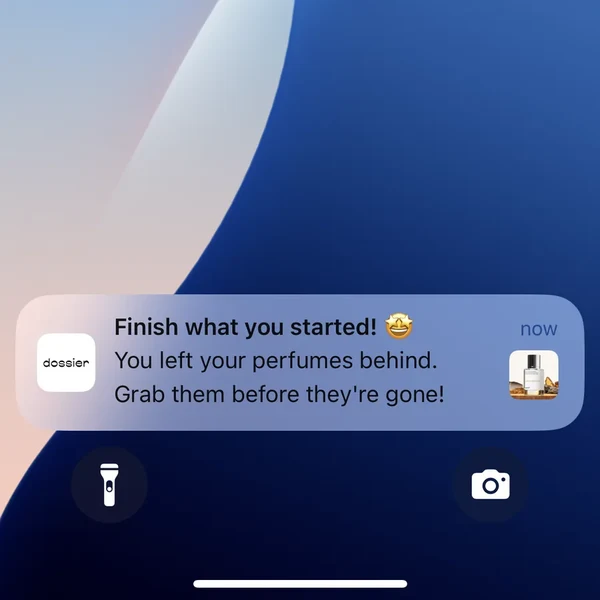
An abandoned-cart notification can return a signed-in app user to the products they left behind.
The message should restore the right cart or at least open the relevant items. Suppress it if the customer has already purchased. Discounts can help in selected cases, but sending one automatically trains shoppers to wait for a coupon.
Back in Stock
Back-in-stock push is one of the clearest exchanges of value. The customer asks about a specific unavailable product, and you reply when they can buy it.
Send the message while stock is genuinely available, and deep-link to the correct product and variant. If inventory is limited, don’t promise more certainty than your stock system can support.
Price Drop
Price-drop alerts work best when they’re based on an expressed interest, such as a saved product, wishlist item, or alert request.
A broad message about a sale is a promotion. A message that a specific saved item now costs less is personal utility, and it gives the customer a clear reason to keep notifications on.
Product Launches and Early Access
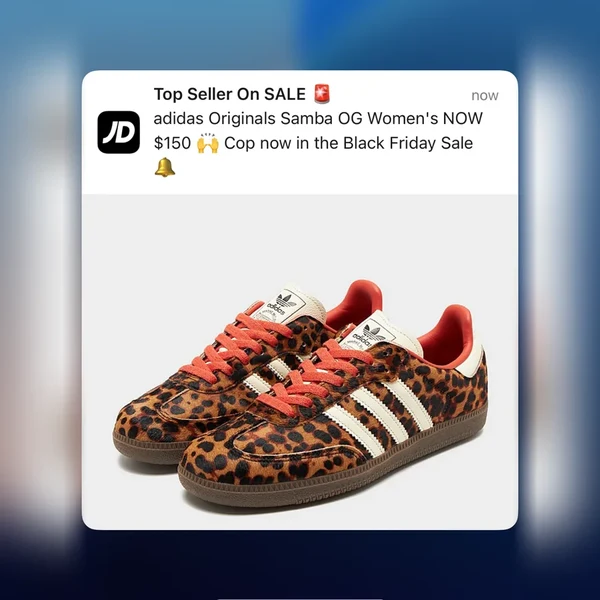
Launches, drops, and limited releases suit push because timing matters. Your app can give loyal customers early access or alert them the moment availability begins.
Targeting matters here. A customer who repeatedly buys one category doesn’t need every launch from your entire catalog.
Loyalty and Rewards
Push can remind members about a reward they’ve earned, progress toward the next tier, or a benefit that’s genuinely about to expire.
The notification should open the relevant loyalty screen, not a homepage that makes the customer search for it.
Replenishment and Reorder
Products with a predictable usage cycle support useful reorder reminders. Base the timing on each customer’s purchase and expected consumption rather than a fixed date for everyone.
For example, a coffee store could remind a customer about the beans they last bought as their usual reorder date approaches. If the customer has an active subscription or has already reordered, suppress the reminder.
Opening the exact product or a prepared repeat order makes reordering faster, which is the whole point of the message.
Win-Back
Win-back campaigns should reflect customer history and a meaningful period of inactivity. A generic discount sent to everyone after the same number of days rarely feels personal.
Use product interest, purchase cadence, loyalty status, and current availability to decide whether there’s a relevant reason for that customer to return. Our guide to ecommerce app retention covers how win-back fits alongside the rest of your retention program.
How to Segment Push Audiences
Segmentation exists to stop you sending messages that don’t apply, not to show how much data you hold.
Useful inputs include purchase history, product or category interest, cart and wishlist status, loyalty tier, subscription status, app activity, location, local time, and notification preferences.
Each extra condition narrows the audience and adds operational work. Start with segments that clearly change the message or destination. “Customers interested in women’s running shoes whose saved pair is back in stock” is actionable. A complex predictive audience with no different offer or journey usually isn’t.
Use customer data responsibly and in line with the consent you’ve collected.
Write for the Lock Screen
A push notification has very little space to earn attention, so lead with the useful information. Name the product, event, reward, or action, and explain why it matters now without forcing fake urgency into every message.
The title and body should make sense before the customer taps. Vague copy can win curiosity clicks while eroding trust, because the destination reveals that nothing meaningful happened.
The landing screen must fulfill the message:
- A back-in-stock alert opens the product, in stock.
- An order alert opens order tracking.
- A collection promotion opens that collection with the offer already applied or explained.
“Your saved trail shoes are back in size 9” should lead to those shoes with size 9 available. “Your reward expires Friday” should lead to the reward and explain how to use it. Review copy and destination together so every tap delivers what the message promised.
How Often Should an Ecommerce App Send Push Notifications?
The right push frequency for an ecommerce app depends on the message type and the customer’s behavior, not a single weekly number.
A fashion brand with frequent drops has a different rhythm from a furniture store. Transactional alerts have a different tolerance from broad promotions. A customer who requested three product alerts may welcome more messages than someone who installed your app once and never returned.
Set limits by message type and customer behavior. Send in the customer’s local time, pause marketing after a recent purchase when it makes sense, and stop several automations from stacking on the same person on the same day.
Preference controls let customers choose the subjects they care about. Even simple options for launches, offers, restocks, and order updates give the channel more room to stay useful, and on iOS an in-app opt-out for marketing messages is required by Guideline 4.5.4.
Watch opt-outs and uninstalls after each send. They’re part of campaign performance, not unrelated product metrics.
Stop Automations When the Customer’s Situation Changes
Automated push can react quickly to cart, browsing, inventory, loyalty, and order events. It can also keep sending after the original reason has disappeared.
Every automation should define who enters, what must still be true before each send, and what removes the customer from the flow:
- An abandoned-cart message stops after a purchase or cart change.
- A back-in-stock flow stops when the item sells out again.
- A replenishment reminder accounts for a later order.
- A win-back sequence stops when the customer returns.
Those rules only work when your app, ecommerce platform, and messaging system share reliable event and identity data. Our guide to ecommerce app APIs, integrations, and data sync covers that layer.
How to Measure Ecommerce Push Notifications
Delivery and open rates describe what happened to a message, but they don’t tell you whether the campaign improved your business. Measure the whole path from eligible audience to outcome.
| Stage | Useful measures |
|---|---|
| Permission | Prompt views, opt-in rate, later opt-outs |
| Delivery | Valid tokens, delivered messages, delivery failures |
| Engagement | Opens, dismissals where available, deep-link success |
| Commerce | Product views, add-to-cart, checkout, conversion, revenue |
| Customer impact | Uninstalls, notifications turned off, repeat purchases |
Attributed revenue can overstate impact. A loyal customer may have bought anyway, especially during a major launch or sale.
Use holdout groups where your platform and audience size allow it. Compare a group that receives the notification with a similar group that doesn’t, and treat the difference as your estimate of incremental lift. Our guide to calculating incremental revenue from an ecommerce app walks through the method.
Report transactional, requested, and marketing campaigns separately. A shipping alert succeeds when it informs the customer. It doesn’t need to create another order. For how push metrics fit alongside the rest of your reporting, see our guide to ecommerce app analytics and KPIs.
Common Push Notification Mistakes
The most common push mistake is treating access as free. Each send costs almost nothing, so every campaign goes to everyone.
Other mistakes follow from the same mindset:
- Asking for permission before explaining the benefit.
- Repeating the same message already sent by email and SMS.
- Using urgency that isn’t true.
- Opening the wrong destination.
- Ignoring time zones.
- Measuring only opens or attributed revenue.
Poor data connections cause a different class of problem. Messages arrive after the customer has bought, products are no longer available, loyalty balances are wrong, or the app opens without the promised state. Your push program is only as good as the rules and systems behind it.
A Practical Push Strategy for Launch
A new ecommerce app doesn’t need dozens of automations on day one. Start with transactional messages and one or two requested alerts that clearly help customers, then add a small number of marketing campaigns tied to real events such as launches, early access, or loyalty benefits.
Before you expand, confirm that permission prompts, deep links, suppression rules, analytics, and opt-out handling all work. Our app launch checklist includes these checks alongside the rest of your go-live work.
Then let behavior and controlled tests decide which campaigns earn more reach. When you’re ready to refine targeting, timing, and copy, our ecommerce push notification best practices go deeper on each.
Final Thoughts
Push notifications are valuable because they put your store on a customer’s phone after that customer has chosen to install your app and allow contact.
Each useful message gives them a reason to keep that permission on. Each irrelevant or mistimed one makes the next send less welcome.
The strongest programs start with a few moments your customers care about and handle them reliably. As you learn what earns a response and lifts repeat purchasing, you can expand without losing the usefulness that made people opt in.
Ecommerce Push Notification FAQs
Do You Need a Mobile App to Send Push Notifications?
You don’t strictly need a mobile app to send push notifications, because web push works from a website in supported browsers. On iPhone, though, web push only works for web apps added to the Home Screen, so native app push is the more reliable way to reach iOS shoppers.
What’s a Good Push Notification Opt-In Rate?
A good push notification opt-in rate is one at or above the platform average. Batch’s 2025 benchmark puts that average at 56% on iOS and 67% on Android, so track your rate separately by platform and by the moment you ask.
Can You Send Promotional Push Notifications on iOS?
You can send promotional push notifications on iOS if customers have explicitly opted in to marketing messages through consent language in your app. Apple’s App Store Review Guideline 4.5.4 also requires an in-app way to opt out of those messages.
What Are the Best Push Notifications to Start With?
The best push notifications to start with are order updates and alerts customers request, such as back-in-stock and price drops on saved items. They’re expected, easy to make relevant, and give customers a reason to keep notifications on before you add marketing campaigns.
How Do You Know Whether Push Notifications Increase Sales?
The most reliable way to know whether push notifications increase sales is a holdout test. Send a campaign to most of an audience, hold back a similar group, and compare what both groups buy. Attributed revenue alone credits push with purchases that might have happened anyway.